Social Media Graphics Builder: A Time-Saving Tool for Designers, Marketers, and Bloggers
In today’s fast-paced digital world, social media presence is essential for businesses and individuals alike. Creating eye-catching graphics that stand out on platforms like Instagram, Facebook, and Twitter can be time-consuming. Enter Social Media Graphics Builder—a tool designed to streamline the design process while offering flexibility and creativity. This article explores what makes Social Media Graphics Builder unique, how it compares to other tools, and when it might be the right choice for your needs.
What Is Social Media Graphics Builder?
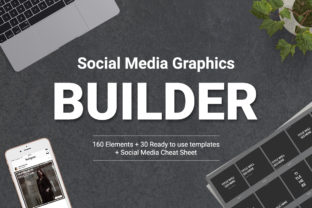
Social Media Graphics Builder is a specialized design tool that allows users to create professional-quality social media graphics quickly. Unlike traditional design software that requires extensive manual work, this tool offers pre-designed templates and customizable elements that can be adjusted to fit specific brand guidelines or creative visions. Its focus on efficiency and scalability makes it an attractive option for busy professionals who need high-quality visuals without the learning curve of more complex programs.
The tool is built with Adobe Photoshop CS6 in mind, making it compatible with a widely used industry standard. This compatibility ensures that users can integrate their existing workflows seamlessly. Additionally, because the graphics are created using shape layers and paths, they remain crisp and clear at any size, eliminating the need for constant resizing or reworking.
How Does It Compare to Other Tools?
When evaluating design tools, it's important to consider factors such as ease of use, customization options, and integration with existing software. Social Media Graphics Builder stands out by focusing on speed and simplicity without sacrificing quality. While some graphic design tools require advanced skills or lengthy setup times, this tool is designed to be accessible to users with varying levels of experience.
Compared to generic design platforms, Social Media Graphics Builder offers a more targeted approach. Instead of providing a broad range of design elements, it focuses specifically on social media graphics, ensuring that the templates and assets are optimized for common platform requirements. This specialization can save time and reduce the need for additional adjustments.
For users who prefer a more hands-on approach, tools like Adobe Illustrator or Canva may offer greater flexibility. However, these alternatives often come with steeper learning curves or require more manual effort. Social Media Graphics Builder bridges the gap between quick design and professional results, making it ideal for those who want efficiency without compromising on visual appeal.
Strengths and Best-Fit Situations
One of the key strengths of Social Media Graphics Builder is its ability to generate multiple design combinations quickly. This feature is particularly useful for content creators who need to produce a variety of graphics for different posts or campaigns. By mixing and matching elements, users can maintain a cohesive look across their social media presence while avoiding repetition.
The clean file setup is another advantage. With well-organized layers and elements, users can easily locate and adjust specific components without sifting through cluttered files. This organization is especially beneficial for teams or freelancers who may need to collaborate on projects or revisit designs at a later date.
For beginners, the included video tutorials provide a helpful starting point. These resources guide users through the basics of the tool, reducing the initial learning curve and helping even those with limited design experience create effective graphics. This accessibility makes Social Media Graphics Builder a valuable asset for bloggers, small business owners, and marketers who may not have formal design training.
Tradeoffs and Limitations
While Social Media Graphics Builder offers many benefits, it is not without limitations. Its focus on speed and simplicity means that it may not provide the same level of detailed customization as more advanced design software. Users who require highly intricate or unique designs may find that the tool’s pre-set options are insufficient for their needs.
Additionally, since the tool is designed for Adobe Photoshop CS6, it may not be compatible with newer versions of the software or alternative platforms. This limitation could be a drawback for users who rely on more recent design tools or who prefer cloud-based solutions. However, for those already using Photoshop CS6, this compatibility is a significant advantage.
Another consideration is the tool’s reliance on pre-designed templates. While this can save time, it may also lead to a lack of originality if users do not take the time to customize the graphics effectively. The best results come from combining the tool’s templates with personal input and branding elements.
When to Choose Social Media Graphics Builder
Social Media Graphics Builder is an excellent choice for users who need to produce consistent, high-quality graphics quickly. It is particularly well-suited for businesses with regular content schedules, such as marketing agencies, e-commerce brands, or influencers who post frequently. The tool’s efficiency helps maintain a strong online presence without requiring a dedicated design team.
It is also a good fit for individuals who want to improve their social media engagement. By creating visually appealing graphics, users can attract more clicks, likes, and shares, which can translate into increased followers, conversions, or sales. The scalable nature of the graphics ensures that they look professional on all devices and screen sizes, further enhancing their effectiveness.
For those who are new to design or have limited time, the tool’s user-friendly interface and tutorials make it an accessible option. It allows users to create polished graphics without the need for advanced technical skills, making it a practical solution for a wide range of users.
When to Consider Alternatives
There are situations where other tools may be more appropriate. For example, users who require highly customized or complex designs may benefit from using Adobe Illustrator or Figma, which offer more advanced features and greater control over every aspect of the design. These tools are better suited for designers who want complete creative freedom and are willing to invest time in mastering the software.
For those who prefer a more intuitive, drag-and-drop interface, platforms like Canva or Adobe Express may be a better fit. These tools are designed for ease of use and often include a wider range of templates and assets. However, they may not offer the same level of scalability or integration with Photoshop as Social Media Graphics Builder.
Ultimately, the choice depends on the user’s specific needs, skill level, and workflow. Social Media Graphics Builder excels in efficiency and consistency, but it is not the only option available. Evaluating the strengths and limitations of each tool can help users make an informed decision that aligns with their goals.
Conclusion
Social Media Graphics Builder offers a practical solution for creating professional-looking social media graphics quickly. Its focus on efficiency, scalability, and ease of use makes it a valuable tool for busy designers, marketers, and bloggers. While it may not replace more advanced design software, it provides a streamlined approach that can significantly reduce the time and effort required to produce high-quality visuals.
By understanding its strengths and limitations, users can determine whether it is the right fit for their needs. Whether you're looking to enhance your social media presence or streamline your design workflow, Social Media Graphics Builder is worth considering as part of your creative toolkit.