Web Icons: Designing for the Digital World
Web icons are more than just visual elements; they are essential tools that enhance user experience, communicate meaning, and add aesthetic value to digital interfaces. Whether you're a designer, developer, or content creator, understanding the role of web icons can elevate your projects and make them more engaging. With their ability to simplify complex ideas and guide users through digital spaces, web icons have become a cornerstone of modern design.
At their core, web icons are small, scalable graphics that represent actions, objects, or concepts. Unlike traditional images, they are often created using vector formats, which allow them to maintain clarity at any size. This makes them ideal for use across various platforms, from websites and mobile apps to social media and digital marketing campaigns.
Why Web Icons Matter in Modern Design
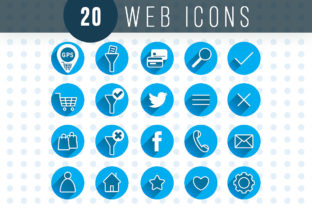
As digital interfaces become more complex, the need for clear and intuitive navigation has never been greater. Web icons provide a visual shorthand that helps users quickly understand functionality without relying on text. For example, a magnifying glass icon is universally recognized as a search tool, while a heart symbol often indicates a favorite or like action.
Moreover, web icons contribute to a cohesive visual language. When used consistently, they create a sense of unity across a website or application. This consistency not only improves usability but also reinforces brand identity. A well-designed set of icons can make a digital product feel polished, professional, and user-friendly.
Creative Possibilities with Web Icons
The versatility of web icons opens up a world of creative possibilities. Designers can experiment with different styles, such as flat design, material design, or glyph-based icons, to match the tone and purpose of their projects. For instance, a minimalist flat design might be ideal for a tech startup, while a more detailed, illustrative style could work well for a children's educational app.
Another exciting approach is to customize icons to reflect a brand’s unique personality. By adjusting colors, shapes, and details, designers can create icons that align with a company’s visual identity. This level of customization ensures that icons not only serve a functional purpose but also reinforce brand messaging.
For developers, web icons can be integrated into code using SVG (Scalable Vector Graphics) or CSS frameworks. This flexibility allows for easy updates and adaptations, making it simple to keep designs fresh and relevant over time.
Applications Across Different Industries
Web icons are not limited to one type of project or industry. They are widely used in e-commerce, education, healthcare, and many other fields. In e-commerce, icons can help users navigate product categories, filter options, and access customer support. In education, they can be used to indicate interactive elements, such as quizzes or multimedia content.
In the healthcare sector, icons can simplify medical information, making it easier for patients to understand instructions or locate services. For example, a hospital website might use icons to show available services, appointment booking, or emergency contact information.
Marketing professionals also benefit from web icons by using them in social media posts, email newsletters, and online advertisements. Icons can draw attention to key messages, highlight calls to action, and improve overall engagement. When paired with compelling copy, they can significantly boost the effectiveness of digital campaigns.
Adapting Web Icons for Different Audiences
One of the strengths of web icons is their adaptability. Designers can tailor their appearance and usage based on the target audience. For example, a younger demographic might respond well to bold, colorful icons, while a professional audience may prefer more subtle, elegant designs.
Accessibility is another important consideration. Icons should be designed with inclusivity in mind, ensuring they are recognizable even for users with visual impairments. This can be achieved by using high contrast, clear shapes, and complementary text labels where necessary.
Additionally, icons can be localized to suit different cultures and languages. While some symbols are universal, others may need to be adjusted to avoid confusion. For instance, a "home" icon is generally understood, but a "shopping cart" icon might vary slightly depending on regional preferences.
Best Practices for Using Web Icons
To get the most out of web icons, it's important to follow best practices that ensure clarity, consistency, and effectiveness. Start by selecting a consistent style that aligns with your project’s goals and audience. Avoid mixing too many different styles, as this can create visual clutter and confuse users.
Another key tip is to test icons in real-world scenarios. Observe how users interact with them and make adjustments as needed. If an icon is not immediately recognizable, consider simplifying its design or adding a label for clarification.
Finally, keep your icon library organized. Use naming conventions and categorization to make it easy to find and apply icons in future projects. This not only saves time but also ensures that your design remains cohesive and professional.
Conclusion: Embracing the Power of Web Icons
Web icons are more than just decorative elements—they are powerful tools that enhance usability, communication, and visual appeal. By understanding their purpose, exploring creative possibilities, and adapting them to different needs, designers and creators can unlock new levels of effectiveness in their work.
Whether you're building a website, developing an app, or creating digital content, incorporating web icons can make a significant difference. With careful planning and thoughtful execution, they can transform the way users interact with your digital products and services.